
Android App Links
Open the Android app when it is already installed.
LIVE SPECIMEN
Universal & Deferred Link SimulatorURL
https://taqlyn.com/shop/checkout?cartId=cart_9841&promo=WELCOME20&aff=partner_8App Links open your Android app from an https URL when the app is installed. Deferred first-open is separate — deferred links.
#Bind fingerprints
On Android bind, include both the upload-key and Play App Signing SHA-256 fingerprints. Production verification fails if Play App Signing is on and you only uploaded the upload key.
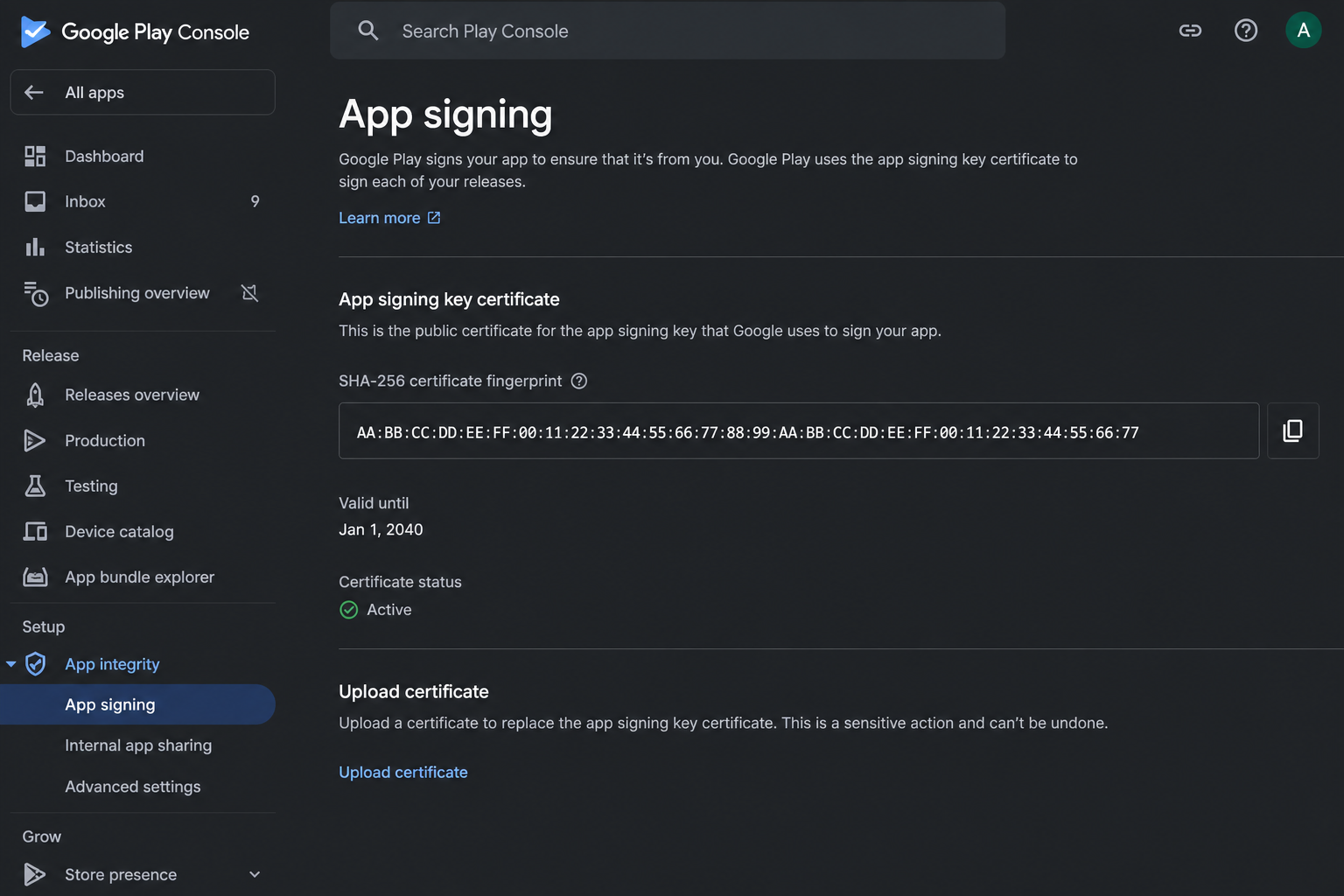
You do not host the Digital Asset Links file. Taqlyn publishes it on the link host after bind.
#Manifest
Use autoVerify on the same host as your Taqlyn links:
<intent-filter android:autoVerify="true">
  <action android:name="android.intent.action.VIEW" />
  <category android:name="android.intent.category.DEFAULT" />
  <category android:name="android.intent.category.BROWSABLE" />
  <data
    android:scheme="https"
    android:host="YOUR_TAQLYN_HOST"
    android:pathPrefix="/" />
</intent-filter>
Forward the Activity intent into the SDK (onCreate and onNewIntent). Map path / params, then consume(linkId).
Full steps: Android.